BillHelp.pk is an independent helper website and is not affiliated with IESCO or PITC. Your bill comes from the official billing system; we make it quicker to find, save and come back to.
How to Check Your IESCO Bill Online by Reference Number
- Take any old IESCO bill, paper or a photo of one, and find the reference number or customer ID (see the next section).
- Type it into the box above. Use digits only, with no spaces or dashes. The checker detects which of the two numbers you entered.
- Press "Check Bill". A summary shows the bill month, amount payable within the due date, the due date and the late-payment amount.
- Tap "View Full Bill" to open the complete printable bill.
Using the official portal instead? IESCO's website links to the PITC bill portal at bill.pitc.com.pk/iescobill. Choose Reference No (or Customer ID), enter your number, select the U or R letter printed after your reference number, type the captcha code if shown, and press Search. It's the same bill either way.
Understanding Your IESCO Reference Number and Customer ID
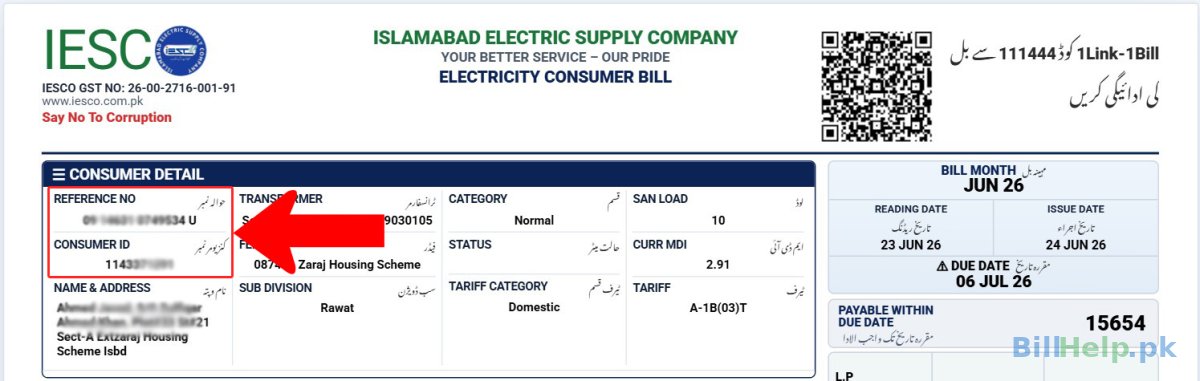
Both numbers are printed in the consumer details box at the top-left of your IESCO bill.
- Reference number: 14 digits followed by a letter, U (urban) or R (rural). The first digits include your batch and sub-division codes, so a typo at the start sends the search to the wrong office.
- Customer ID (Consumer ID): the separate customer ID printed near the reference number on your bill. It belongs to your connection, so it still works if your reference number changes.
Lost every bill? IESCO has a Search Reference Number page on its website. You can also visit your sub-division office or an IESCO customer service centre.
IESCO "17-Digit Reference Number": What Actually Changed
Many people search for an "IESCO 17 digit reference number". In July 2026, IESCO reorganised the billing batch numbers of consumers with AMI (smart) meters in the Rawalpindi City and Rawalpindi Cantt circles. Old batches were merged into new batch numbers 17 to 23 and 31 (for example, old batches 1 and 2 became batch 17). Because the batch is part of the reference number, your reference number may have changed if you are an AMI consumer in Rawalpindi.
- If your old number now shows "invalid", search with your Customer ID instead. IESCO says the updated reference number can be found through the Consumer ID on your bill or on its website.
- Update the number saved in your banking app, wallet or BillHelp.pk account.
- Questions: contact your SDO/revenue office or nearest customer facilitation centre.
More detail: AMI meters explained · IESCO reference number update
Download or Print Your IESCO Duplicate Bill (PDF)
A duplicate bill is a fresh copy of your current bill, useful when the paper bill is late, lost, damaged or with your landlord.
- Phone: open the full bill → browser menu (⋮ in Chrome, Share in Safari) → Print → Save as PDF.
- Computer: open the full bill → Ctrl + P (Cmd + P on Mac) → Save as PDF or choose a printer.
The online portal shows your current bill. For older bills, ask at your sub-division office. IESCO's own FAQ also says duplicate bills are available at its customer service centres.
IESCO Bill in Islamabad
IESCO's Islamabad Circle covers the Federal Capital. IESCO's phone directory lists operation divisions including Islamabad-I, Islamabad-II and Bhara Kahu. Your bill shows your sub-division and division name, so use it to find the right office.
- Head office: Street 40, Sector G-7/4, Islamabad · (051) 9252937 (as listed on iesco.com.pk)
- Divisions and phone numbers:iesco.com.pk → Contact Us → Phone Directory → Operation Divisions
- Other bills in Islamabad:SNGPL gas · PTCL · Nayatel
IESCO Bill in Rawalpindi
Rawalpindi is split into two IESCO circles: Rawalpindi City and Rawalpindi Cantt. Operation divisions in the Rawalpindi area listed in IESCO's directory include City, Satellite Town, Westridge, Cantt, Tariqabad, Rawat, Mandra, Taxila and Gujar Khan. Your bill shows your division name.
Two things matter most for Rawalpindi consumers:
- AMI meter batch change (July 2026). If you have a smart meter in Rawalpindi City or Cantt circle and your saved reference number stopped working, search by Customer ID (see the section above).
- Murree and seasonal homes. IESCO's FAQ says a premises can be temporarily disconnected on the consumer's written request for a set period, which is useful for seasonal houses in Murree. Apply at your sub-division.
Other bills in Rawalpindi:WASA Rawalpindi bill · WASA Rawalpindi bill history · SNGPL gas
Other Areas IESCO Serves
NEPRA lists IESCO's service area as Islamabad Capital Territory and the districts of Rawalpindi, Attock, Chakwal and Jhelum. IESCO's licence also mentions supply to adjoining areas of Azad Jammu & Kashmir. IESCO has six operation circles: Islamabad, Rawalpindi City, Rawalpindi Cantt, Attock, Chakwal and Jhelum. Its directory also lists divisions at Pindi Gheb, Talagang, Dhudial and Pind Dadan Khan.
Bills in all these areas are checked the same way. Live in Abbottabad, Mansehra or Haripur? Use HAZECO. In AJK, check whether your bill is issued by IESCO or by the AJK Electricity Department; if it's AJKED, use our AJK bill page.
IESCO Bill Calculator: What Your Sanctioned Load Adds
Since February 2026, part of your bill is a fixed charge for each kW of sanctioned load, not just for units used. In our calculator, 300 units on a 1 kW connection comes to about Rs 12,861. The same 300 units on 3 kW comes to about Rs 13,697 at October 2026 rates. For the slab table, see our IESCO tariff guide.
How to Pay Your IESCO Bill
You only need your reference number to pay:
- Mobile banking apps:Bill Payment → Electricity → IESCO
- Mobile wallets such as JazzCash and Easypaisa
- Bank branches: take a printed copy of the bill
Then confirm with check bill paid or not. Keep your receipt until the payment shows.
Paid but arrears still show? IESCO's FAQ says wrongly added arrears can be corrected by showing the previous bill's bank receipt at your sub-division or a customer service centre. Installments are allowed only on arrears, not on a running bill. See paying electricity bills online.
IESCO Complaints and Helpline
- Helpline: call 118 · SMS:8118 (both listed on iesco.com.pk)
- Online complaints: PITC complaint system ccms.pitc.com.pk (linked from IESCO's website)
- App:IESCO Smart App on Google Play (linked from iesco.com.pk)
- Local office: your sub-division / Customer Services Officer (division name printed on your bill)
Wrong reading or high bill? Compare the meter with the reading on your bill. If it differs, report it to your sub-division with a photo of the meter. See also the electricity help centre, fixed monthly charges explained and how to reduce your bill.
IESCO Bill Check Karne Ka Tarika (Roman Urdu)
Apna purana IESCO bill lein aur us par likha reference number ya customer ID dhoondein. Upar wale box mein number likhen (bina space ke) aur Check Bill dabayen. Bill ki raqam aur due date nazar aa jayegi. View Full Bill par click kar ke bill print karen ya PDF save karen. Agar Rawalpindi mein smart (AMI) meter hai aur purana number kaam nahi kar raha, to customer ID se search karen.
Check other electricity bills:LESCO · GEPCO · FESCO · MEPCO · PESCO · HAZECO · HESCO · SEPCO · QESCO · TESCO · K-Electric · AJK
Last checked: 9 October 2026