1. Digital Billing Infrastructure of WASA Rawalpindi - An overview

Rawalpindi Water and Sanitation Agency (WASA) provides services to hundreds of thousands of residential, commercial and industrial consumers of the Rawalpindi cityscape. WASA has integrated its revenue ledger with 1Bill payment ecosystem of State Bank of Pakistan to streamline the billing operations, reduce physical queuing at bank counters and to ensure financial transparency.

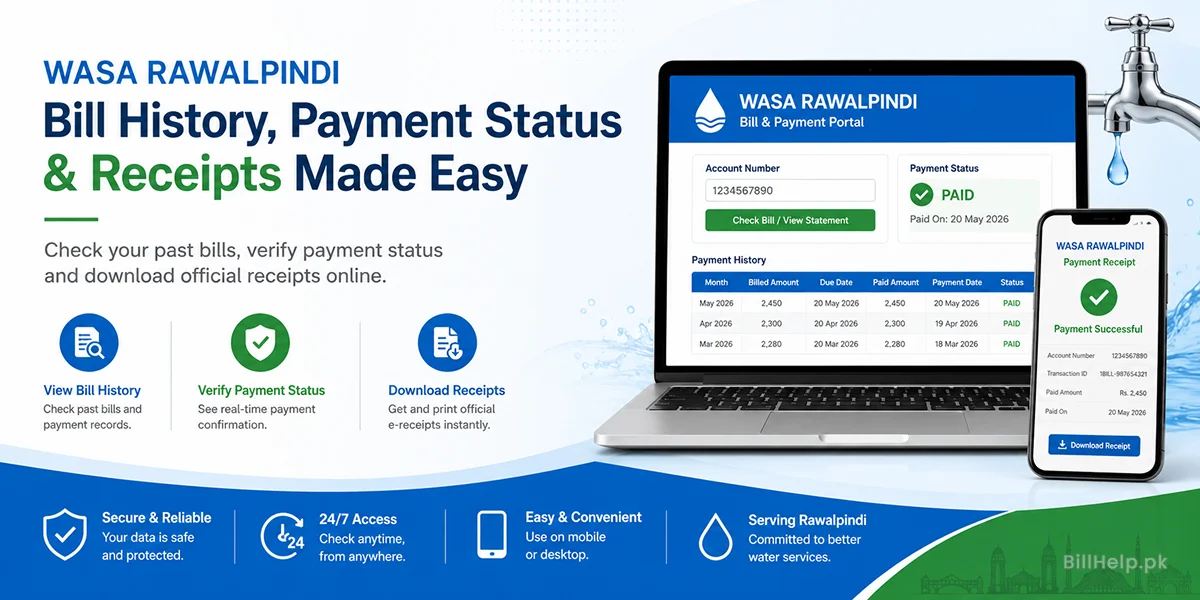
This digital infrastructure will allow consumers to view their current billing statements, access their past payment ledgers and check on their payment confirmation statuses online and download valid digital proof of payments from any mobile device or computer.

2. The importance of keeping records and payment history

Property management, financial hygiene and legal protection require you to have an organized digital or physical archive of your history of utility payments. Here are the key benefits of keeping a record of your WASA billing history:

  • Duplicate Arrears Billing Prevention: Occasionally, there is some delay in communication with the bank and the amount already paid is carried forward to subsequent billing cycles as “Arrears.” Payment receipts allow for the immediate correction.
  • Property Sale & Transfer Clearances (NDC): If you are buying, selling or transferring property in Rawalpindi, then a No Demand Certificate (NDC) can be issued after presenting a clean payment history of 12 to 24 months with no outstanding liabilities.
  • Tenant & Landlord Security: Residential or commercial landlords need periodic billing statements to ensure tenants pay their utility bills before their lease is up or they get their security deposit back.
  • Legal and Municipal Audits: Commercial units, factories and corporate offices must have validated receipts of payments for official tax deductions, municipal audits and operational compliance.

3. WASA Rawalpindi Bill Payment History Online How to Check

WASA Rawalpindi is equipped with consumer web portal and central billing engines which can be accessed online to view past billing records. To obtain your multi-month payment history statement, please do the following:

1. Find your WASA Consumer Account Number

Now print your 10 digit WASA Account Number at the top left side of any WASA Rawalpindi bill paper (physical or digital).

2. Go to the official Bill & History page:

Open up your browser and go to the official WASA Rawalpindi billing portal or the main bill lookup tool on BillHelp.pk.

3. Enter Account Number and Submit Query:

Enter your 10 digit Account Number (no spaces or special characters) in the search field and click “Check Bill / View Statement”.

4. Ledger of Payment History:

After you have supplied your recent billing statement click on the tab called "Payment History" or "Ledgers, from Previous Periods”.

5. Watch your monthly bills:The ledger table that shows you the previous billing months, total billed amount, due date, actual amount paid, date of payment and code of mode of payment.

4. See the current status of the online payment made:

Make sure that the online payment of WASA bill through mobile wallet or banking applications is credited to WASA’s central server. This shall be done as follows:

How to Climb the Ladder of Status:
  • UNPAID / OUTSTANDING: Bill issued by the WASA Revenue Office but payment transaction is not verified by the clearing bank.
  • PENDING/PROCESSING: Funds transferred through third-party application; transaction being cleared through State Bank 1Bill system (usually 1 to 12 hours).
  • PAID / CLEARED: Your payment has been successfully posted to your WASA account ledger. Billing month status: PAID

How to Check Instant Payments:

  1. Digital bank transfers take 24-48 hours to clear through central inter bank system, so please be patient.
  2. Go to the WASA bill lookup portal and enter your 10 digit Consumer Account Number again..
  3. In the status banner in the web copy you will see a green “PAID” badge and transaction date stamp.

5. How to Officially Download & Print WASA E-Receipts

All municipal administrative purposes require proof of payment in the form of physical or digital evidence. How to download e-receipts:

Option A: Download e-Receipt through banking apps

If you pay via the apps of any commercial banks (HBL, UBL, Meezan, Alfalah, Bank Alfalah):

  • Navigate to the “Transaction History” feature of your bank app.
  • Find the transaction for the WASA utility bill you paid.
  • Email the digital receipt with 1Bill TID number and Reference number or select “Download PDF Receipt”.

Option B: E-receipt via mobile wallets (JazzCash/EasyPaisa)

  • Open JazzCash/EasyPaisa app and go to “My Account > Transaction History”.
  • Tap on the specific WASA Rawalpindi bill payment entry.
  • Tap “View Receipt” to save the image or PDF file to your gallery.

Option C: WASA Portal - Print Paid Voucher Web Replica

  • Once your payment clears, you can pay your bill online with your Account Number.
  • Online web copy will have a “PAID” watermark with date and amount of payment.
  • Click on the “Print / Save as PDF” button to save an official duplicate paid bill copy for your physical file.

6. Your WASA Account Number, Consumer ID & Billing Cycle

Consumers should note important identifier codes written on WASA Rawalpindi’s billing invoices to avoid any error in payment or to someone else.

Identifier NameFormat / DigitsDescription & Primary Function
Consumer Account No.10 Numerical DigitsThe primary unique billing ID assigned to your property plot. Used for online bill searches and 1Bill online bill payments.
1Bill Consumer Prefix100052 + Account No.Standardized 1Bill Bill Payment Prefix code used when paying via ATM or online banking platforms under 1Bill Top-Up/Utility options.
Sub-Division Code3 to 4 DigitsIdentifies the regional WASA administrative sub-division (e.g., Liaquat Bagh, Khayaban-e-Sir Syed, Satellite Town) managing your connection.
Tariff Category CodeAlphabetic / NumericIndicates classification of property use (e.g. Domestic Residential, Commercial Plaza, Industrial Bulk, Religious).

WASA Billing Cycle and Due Dates:

WASA Rawalpindi issues water supply and sewerage bills on a bi-monthly or monthly billing schedule depending upon the category of the property and its zone. Normal domestic bills carry a grace period of 10 to 15 days from the date the bill is dispatched to the official Due Date. Any payment made after the due date will automatically be charged a late payment surcharge that will be added to the next billing cycle.

7. Digital Payment Channels & Banking Partners Comparison

WASA Rawalpindi has various electronic payment options to provide flexibility to the consumers for payment of their bills:

Payment ChannelProcessing TimeService FeeReceipt Format
1Bill / Mobile Banking AppsInstant to 24 HoursPKR 0 (Free)Downloadable PDF Confirmation Advice
JazzCash / EasyPaisa WalletsInstant to 12 HoursPKR 0 (Free)In-App Transaction Receipt & SMS Notice
Commercial Bank ATMs24 HoursPKR 0 (Free)Printed Paper ATM Transaction Slip
Bank Counter Cash Payment24 to 48 HoursPKR 0 (Free)Stamped Original Bank Counterfoil Paper
WASA One-Window CountersSame Day (Immediate)PKR 0 (Free)Official WASA Cash Computerized Receipt

8. Reconciliation of Unpaid & Outstanding Payments

One of the most frustrating things for consumers is to pay a WASA bill on time and then see the paid amount being reflected as “Previous Arrears” on the next month’s bill. This is usually because of two main reasons:

  • Cut-Off Date Lag: If you paid your bill on or very close to the due date, the billing print cycle may have run before the bank's digital settlement file cleared into WASA's central server. In such cases the payment shall be automatically reflected in the next month's ledger.
  • Wrong Digit in 1Bill Payment: Entering a wrong digit in 1Bill payment may result in money going to another account or being stuck in a bank suspense ledger.
Action steps to take immediately to settle arrears:

And don't forget carried over arrears on a new bill! WASA automated billing systems may issue a disconnection warning flag on the account as defaulted if an un-reflected payment is not corrected within 60 days.

9.Form of ledger Procedure for Adjustment Application

If payment is not posted within 5 to 7 days then you will need to submit a formal payment reconciliation request to WASA Revenue Directorate. To clean up your ledger, do these:

1. Verification proof download:

Print a copy of the WASA bill in dispute, the receipt of the paid bank transaction or the 1Bill TID confirmation and your bank account statement with the debited entry highlighted.

2. Sample Application for Ledger Amendment in Writing

Write an application to the Assistant Director Revenue, WASA Rawalpindi for correction of ledger Mention your ten digit Account Number, amount paid, transaction date and the ledger credit adjustment you are requesting.

3. Submission of Dossier at One Window Service Center:

You can visit the WASA One Window Revenue Center such as Liaqat Bagh Office. Upload your app file. The center will give you an official tracking number for your diary reference.

4. Verification & Correction Of Accounts :

The Revenue Superintendent verifies the bank transaction id with the daily bank scrolls statements of WASA. Once verified, the official posts a ledger credit adjustment entry which clears the arrears and clears your account to clean status.

10. Late fees, Penalty rules & connection disconnection policy

WASA Rawalpindi Enforcement Rules allow administrative penalties and possible disconnections of services if the WASA utility bills are not paid within the stipulated time:

  • Late Payment Surcharge (LPS): Payments received after the due date will be assessed a standard 10% late charge added directly to the principal balance on the next billing invoice.
  • Disconnection Warning: Accounts with 2 or more consecutive months of unpaid water supply or sewerage charges will be marked for disconnection. WASA sends final 7 day notice Form 'C' requesting full payment.
  • Physical Line Plug & Severance:  WASA field teams physically plug or cut the supply line ferrule connection on street main line in case of non-payment of arrears after notice period.
  • Costs of reconnection: For reconnection of disconnected water line, all pending historical arrears, 10% late surcharge and specific WASA Reconnection Fee (from PKR 2,000 to PKR 10,000+ depending on type of connection) shall be paid.


    11. WASA Rawalpindi One-Window Facilities & Revenue Offices

For manual bill verification, ledger rectifications, duplicate bill printing or payment disputes, visit the relevant WASA Sub-Divisional Revenue Office in your area:

Main Revenue Office (Liaquat Bagh)

RDA Complex, Murree Road, Near Liaquat Bagh,

Rawalpindi, Punjab.

Helpline: 1334 / (051) 9270011

Services: Ledger Corrections, Arrears Verification, Formal Disputes.

Sub-Divisional Revenue Counters

Khayaban-e-Sir Syed: Sub-Divisional Office, Sector 2.

Satellite Town: Block A Service Center, Commercial Market.

Shamsabad / Moti Mahal: Regional Office, Murree Road.

Timings: Monday – Thursday (9:00 AM – 5:00 PM), Friday (9:00 AM – 1:00 PM).

12. Frequently Asked Questions FAQ's

If your payment status does not update to "PAID" after 72 hours, retrieve your bank transaction receipt or 1Bill Transaction ID (TID) and contact WASA Rawalpindi billing support or visit the One-Window counter at Liaquat Bagh for a manual ledger update.

Your 10-digit Consumer Account Number is prominently printed on the upper left-hand side of any previous physical WASA water bill copy, right next to your consumer name and property address.

Yes! You can easily download and print an official duplicate copy of your WASA Rawalpindi bill anytime by entering your 10-digit Account Number into the bill search portal on BillHelp.pk or the official WASA website.

Yes, bank e-receipts and 1Bill digital payment vouchers displaying a valid Transaction ID (TID) are legally accepted by WASA Rawalpindi, RDA, Excise & Taxation and legal authorities for verification and NDC clearance.

If the Account Number is wrong you should immediately file an application for misrouted payment claim to WASA Revenue Directorate along with your bank transaction receipt. Once the ownership of the account is verified by WASA officials, they can reverse or transfer the money.

Want Additional Utility Assistance in Pakistan?

BillHelp.pk provides comprehensive online guides, duplicate bill checking tools, tariff calculators and utility guides.

Visit BillHelp.pk Home