Suthra Punjab Digital Architecture – An Overview
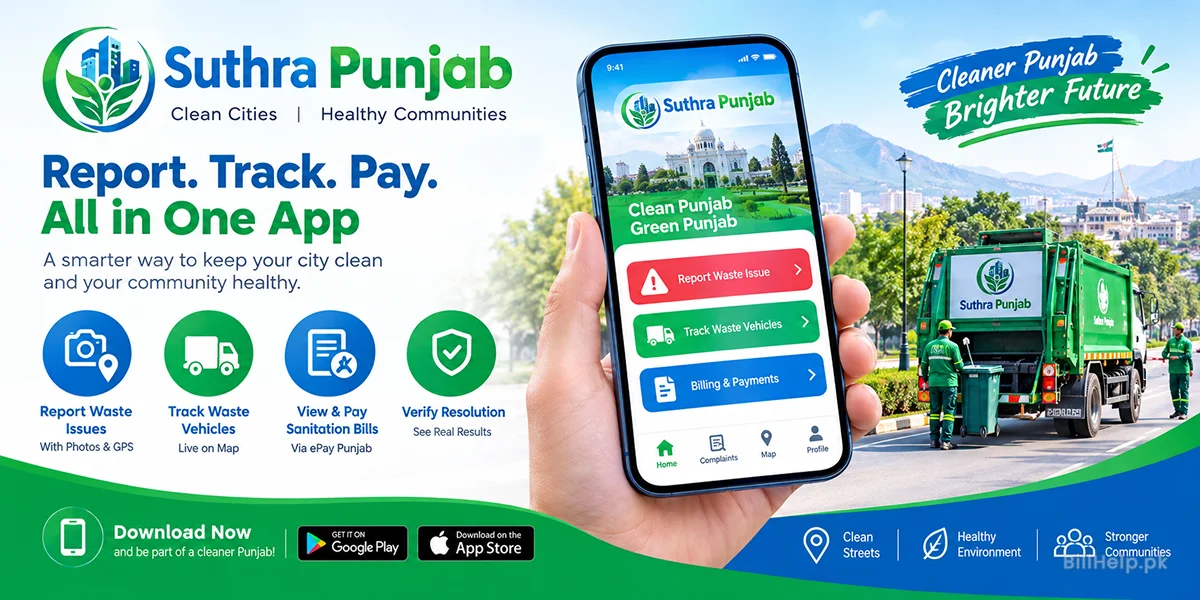
The Suthra Punjab Mobile Application is a key digital tool developed by the Punjab Information Technology Board (PITB) for the Local Government and Community Development (LG&CD) Department. It modernizes municipal waste management into a transparent, data-driven system. Citizens can quickly report uncollected garbage, illegal dumping, blocked drains, and public health hazards in real time. Using GPS tracking, photo verification, and automated routing, the app instantly assigns each issue to the assigned local field worker.
Beyond reporting complaints, the app serves as a complete municipal management portal. Residents can track waste collection trucks live on their streets, check monthly sanitation bills, review payment history, and submit official requests for fee exemptions.
Suthra Punjab App Features
Smart Geo-Tagged Image Capture & Auto-Location Binding
The latest version replaces standard manual address input with an automated spatial binding engine. When a citizen captures a photo of an uncollected waste heap through the app, the system embeds precise latitude and longitude metadata into the file. field workers from reporting that they can’t find the site, and reduces duplicate reporting errors.
Live Waste Vehicle Tracking & Route Radar
The app has a live map view, integrated with GPS transponders on municipal compactors, arm-rolls and mini-dumpers. Citizens can monitor waste collection vehicles in their designated Union Council, get an estimate of their arrival times and get push notifications when the collection crew enters their immediate neighborhood.
ePay Payment Portal & Unified Digital Biller
The mobile app is a complete financial portal for property owners. Users can input their Property Identification Number (PTIN) to retrieve monthly sanitation bills, review payment status, inspect historical receipts and launch direct 17-digit PSID payment requests via the ePay Punjab engine.
Independent Resolution Verification Workflow
To eliminate false ticket closures by field staff, the app requires mandatory citizen feedback. Thus, when a sanitary worker reports a job as "Cleaned" along with an after-cleaning photo, the ticket is left pending until the reporting citizen inspects the location and confirms satisfaction via a binary button.
4. How to Install & Set Up Your Citizen Account Step by Step
With a valid cellular identification, you can easily install and activate your Suthra Punjab mobile profile. Here’s how to set up your account using this operational guide:
Installation and Configuration
- App Browse: Download and install the "Suthra Punjab" app on your mobile device.
- Download & Install: Tap on Install. The core installation package is about 45 MB. Please make sure you're on a good cellular data or Wi-Fi connection during installation.
- . System Permissions Award: When you launch the application for the first time, you will be asked to grant three core system permissions: Location Access (select "While Using the App"), Camera Access (for taking photo of complaint) and Storage Access (for temporary file caching).
- Mobile Phone OTP Authentication: On the main sign in screen put in a live 11 digit Pakistani mobile number (e.g. 03001234567). Send OTP Code Click here Within 30 seconds you will receive a 4 digit OTP in SMS on your registered mobile number.
- Profile Registration: Write your full legal name, 13 digit Computerized National Identity Card (CNIC) number, main district, tehsil and union council number. Click Complete Registration to get to the main dashboard.
5. End-to-End Solution for Field Reporting and Photo Geotagging
If you register a waste management complaint via the mobile application, the request goes directly to the sanitation supervisor of your locality without any manual routing. Do this exact thing to file an actionable report:
Step A: Live Evidence Capture
On the home dashboard, tap the big red ‘Report Waste Issue’ button. The app camera will open automatically. Frame the uncleaned waste heap, blocked drain or broken dumpster clearly. Photos must be taken live; uploading old images from the device gallery is restricted to prevent fraudulent claims.
Step B: Confirm GPS Coordinates
The application will display an interactive satellite map showing your detected GPS location along with the calculated street name and Union Council ID. If you are making a complaint for a location in the vicinity, move the map pin manually.
Step C: Choose Problem Category
Choose the correct category from the drop down menu: Sanitary Worker Absence Clogged Drain / Sewerage Backup Open Dump Waste Clearing Uncollected Door to Door Garbage Commercial Market Litter.
Step D: Submission of Ticket ID
Include any extra written comments if you wish (such as. “Dumpster overflowing near main mosque”) and press Submit Ticket. The app will display a 6 digit Complaint ID (e.g. SP-884920) and send a confirmation SMS to your mobile phone.
6. Live Fleet GPS Tracking & Schedule Integration
One of the biggest enhancements in 2.1.0 is the public integration of city vehicle tracking systems. Citizens no longer have to guess when the garbage collection truck will come to their street.”
How Fleet Radar Works:
- Automated Vehicle Mapping: GPS tracker is fitted in all the waste collection trucks, tractor-trolleys and three wheeler rickshaws of Punjab municipal corporations.
- Union Council Geo-Fencing: The app automatically detects your registered Union Council and shows only active waste vehicles operating within your area.
- Collection Route Schedules: Click on any moving vehicle icon to see the name of the driver assigned to it, vehicle registration number, active route path and estimated arrival time at your street block.
- Missed Route Alerts: If a scheduled collection vehicle does not enter your sector within its operating window, the app will highlight your zone in yellow, allowing you to submit a “Missed Route Alert” to district supervisors with a single tap.
7. Digital Sanitation Bill Viewing & ePay Punjab Payment
Under Punjab Local Government tax rules, property owners in urban and commercial areas are required to pay monthly sanitation bills for waste management services. The Suthra Punjab Mobile App has a complete financial billing interface.
How to View & Pay Your Bill in the App
- Click the “Billing & Payments” tab under the main navigation bar.
- Click "Add Property" and enter your 10-digit Property Tax Identification Number (PTIN) or local municipal consumer ID.
- The screen will render your current billing statement, including total payable charges, due date, property measurement classification and previous payment ledger.
- To pay online, click "Pay Now via ePay". The app generates a 17-digit Payment System Identifier (PSID) code.
- Copy PSID code and pay using any mobile application of Pakistan’s commercial bank, ATM, JazzCash, EasyPaisa or 1Link banking portal.
8. Troubleshooting & App Permissions and FAQ
The below troubleshooting procedures and FAQs are to help you out with any technical/operational issues on Suthra Punjab Mobile Application:
| Observed Issue / Error | Probable Root Cause | Recommended Technical Solution |
|---|---|---|
| "GPS Location Not Found" | Location permissions disabled or device in "Battery Saver" location mode | Android / iOS Settings > Apps > Suthra Punjab > Permissions > Location > "Allow High Accuracy". |
| "OTP Code Not Received" | Cellular network congestion or SMS blocked by converted network (MNP). | Wait for 60 seconds. Click on Resend OTP through Voice Call Or check if you have short code messaging enabled for your SIM Card. |
| "Camera Screen Black / Freeze" | App or camera permission is blocked in the background. | Force stop the app, clear app cache under device settings and ensure camera permissions are active. |
| "Invalid Property PIN Number" | Property not yet mapped in PITB Excise database. | Submit Suthra Punjab Form-A to your local municipal office to link your property tax record. |