How to Get K-Electric Duplicate Bill on WhatsApp, SMS and Email
This is a frustrating barrier if you lose physical copies of utility bills or postal deliveries are delayed right when payment due dates are approaching. Thankfully, for those living in Karachi and the surrounding areas serviced by K-Electric (KE), keeping track of paper-based bills is now a thing of the past. K-Electric, Pakistan’s leading vertically integrated power utility, has launched a suite of highly efficient digital service channels, to bring convenience right to your fingertips – on your smartphone and computer.
Essential Pre-requisites: Locating Your Credentials
Before you try to get your bill using any method you must find the special identification numbers that belong only to your electricity account. K-Electric uses two identifiers in its automated systems. Keeping these identification numbers ready will make the bill retrieval quick and free of mistakes.
13-Digit Account Number
This is your primary billing identity. It is a 13-digit numerical code unique to your physical premises. You can find this prominently printed at the top-right or top-left corner of any previous paper bill. Digital channels primarily utilize this 13-digit number to fetch duplicate bills.
Now lets learn how you can get your bill in digital format via sms, email or whatsapp. There are official and unofficial ways, and we'll go through both of them. BillHelp.pk itself provides monthly bill email service where you can enter K-Electric Account Number, and email address and start receiving your bill notification emails every month. The email services provided by BillHelp.pk is completely free and anyone can subscribe from any part of the world.
Here are the official ways to get your digital bill:
Method 1: Get Duplicate Bill Through WhatsApp Service
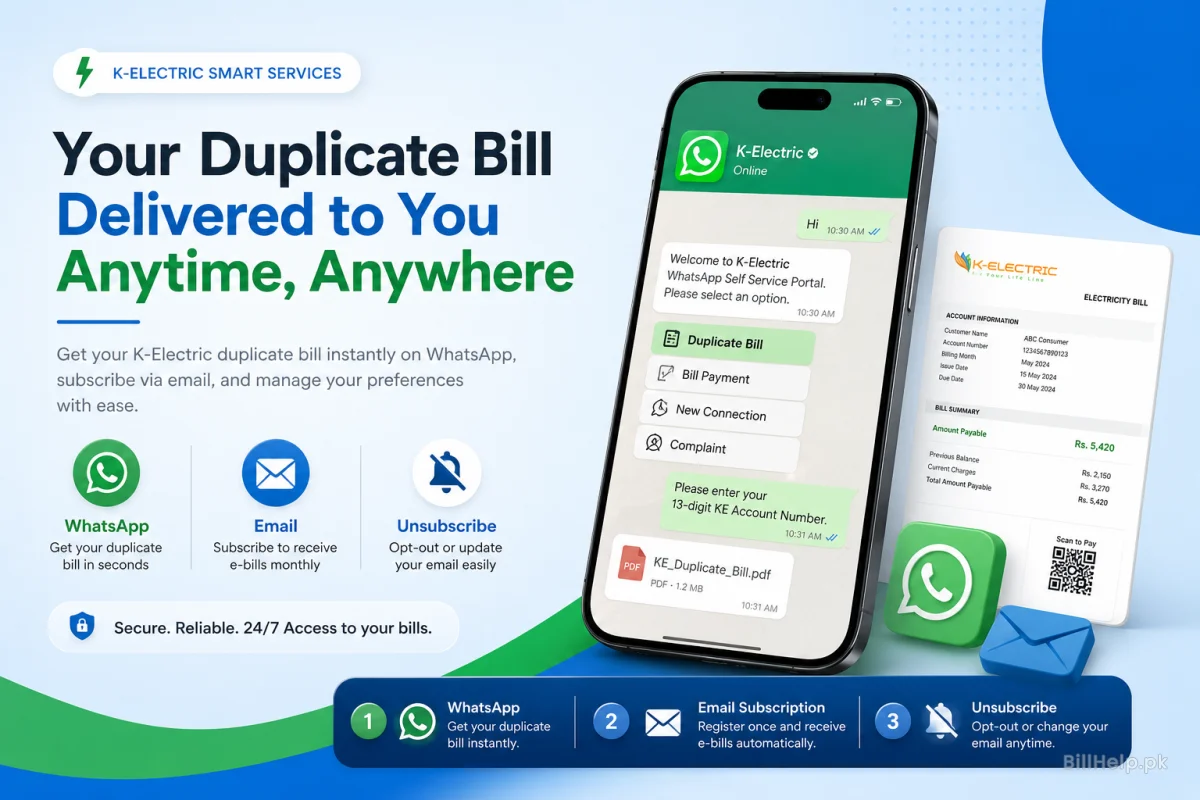
The quickest, most popular and easiest way to get duplicate utility bills is through the K-Electrics WhatsApp self-service portal. The chatbot is available around the clock. You can generate PDF bills, check your payments, lodge complaints and subscribe for updates from your mobile phone. I use it whenever I want a bill.
K-Electric Official WhatsApp Support Number
Add K-Electric WhatsApp Business Number to your contacts:
Always check for the verified badge on the WhatsApp profile. This means you are talking to the K-Electric automated assistant, keeping your account secure. I always check the badge before sending a message.
How to Use WhatsApp: Step-by-Step Instructions
Save Contact & Start Chat
Save +92 348 0000118 in your phone contacts as 'K-Electric WhatsApp'. Open WhatsApp find that contact and then send a greeting like "Hi" "Hello" or Bill to start a chat.
Choose Language Preference
The automated assistant will welcome you. Please choose your language. Reply 1 for English or 2 for Urdu.
Go to Duplicate Bill option
You will be presented with a main menu with numbered options. Each option is linked to a service. Reply with number for 'View/Download Bill' or 'Duplicate Bill'. Usually it’s option 1 or 2. This may change as updates occur. Click Duplicate Bill to get a copy of the Bill to get another Bill.
Enter Account Number
The system will ask you to enter your 13 digit K-Electric Account Number. Please carefully type the 13 digits. 0400012345678 Then send.
Download High-Resolution PDF
The chatbot will process your request in few seconds. The chatbot will respond with a summary of your billing status, including your amount due and your due date. You will also receive a pdf copy of your full electricity bill. To save the electricity bill to your phone memory, tap on the download icon.
Method 2: Get Duplicate Bill Details Through SMS Service
In case you don’t have an internet connection, K-Electric offers an easy-to-use Short Message Service (SMS) platform with your smart phone or WhatsApp.
Official K-Electric SMS Short Code
All SMS commands must be addressed and sent to the official short code:
A. One-Time Duplicate Bill Inquiry via SMS
If you want to quickly check your current bill amount and due date without registering your mobile number permanently:
- Open your mobile phone Messaging/SMS application.
- Create a new message draft.
- Type your 13-digit K-Electric account number in the text area. Example message: 0400012345678
- Send the message to short code 8119.
- An automated reply will be sent to you in the form of a text message within a minute with the details of your current billing cycle, total amount due before the due date, late surcharge, due date and payment status.
B. Sign up for automatic monthly SMS alerts
Rather than sending SMS requests manually every month, you can register your mobile number with KE’s 8119 service to get automatic notifications for bill generation, due date reminders and payment receipts.
Registration Syntax
Send SMS with keyword REG followed by a space and your 13 digit account number.
Example: REG 0400012345678
Text this message to 8119.
Method 3: Obtain Duplicate Bill Via Email Services
It’s a good practice for property owners, businesses and organized households to get your monthly electricity bill delivered straight to your email inbox. With an email delivery system, you have a digital copy always archived and searchable in cloud storage.
E-Bill Subscription & Digital Mail Service
K-Electric offers consumers the option to enrolll in its E-Bill initiative, whereby once the monthly billing cycle is completed, a complete high-resolution duplicate PDF bill is emailed to them automatically.
How to register for monthly E-Bill statements by Email:
Go to the official KE web portal
Open your web browser and visit the official K-Electric website (https://ke.com.pk/). Scroll down to "Customer Services". Click on "E-Bill Subscription".
Fill out the E-Bill Registration Form
Launch the browser on your computer. Visit the official website of K-Electric https://ke.com.pk/. Click the tab “Customer Service”. 2 Choose “E-Bill Subscription”.
Confirm Your E-mail Address
Check your email inbox for a verification link from K-Electric. Please click on the activation link to confirm your subscription. From next billing cycle you will receive official PDF bills over email, with physical bills as supplement or replacement.
Request Duplicate Bills On Demand through KE Customer Care
If you are not registered for automatic monthly e-bills and you urgently need a pdf bill sent to your email address, you can contact KE’s digital support desk at customercare@ke.com.pk. Email your 13 digit account number, owner CNIC and billing address and explicitly ask for a duplicate PDF bill for the current month.
Method 4: Other Web Portal & App Downloads
K-Electric also has a robust web and mobile software presence for those who want to access the website on the fly or want to use the complete dashboard for managing their accounts.
1.Web Portal Bill Downloader Direct
Web Downloader (Print duplicate bill directly from a desktop or laptop browser without logging into an account):
- K-Electric Duplicate Bill Generation Page for Public.
- Enter your 13-digit Account Number in the search field.
- Click "Check Bill". The full printable original version of your electricity bill will display instantly on screen, ready for saving or printing.
2. KE Live Mobile Application
The "KE Live" smartphone app (available on Google Play Store and Apple App Store) serves as a complete digital self-service hub. Once you install the app and add your 13-digit account number, you gain access to a rich suite of tools:
- Instant view and download of current and past billing statements (up to 12 months history).
- Real-time tracking of localized load shedding schedules and power outage updates.
- Integration of online bill payment using credit/debit cards and digital wallets.
- Direct lodging and tracking of technical complaints regarding voltage fluctuations or line breakdown.