Monthly Bill – Redesigned. Why? K-Electric
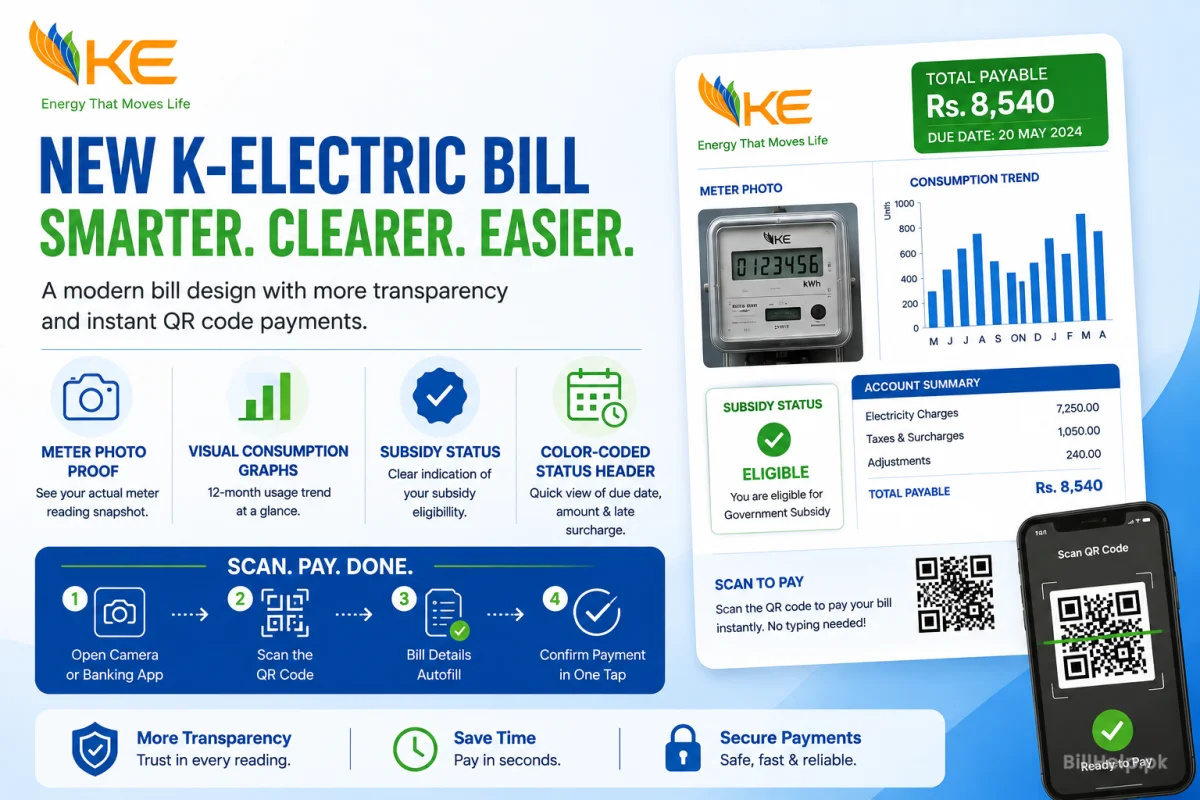
K-Electric (KE) has launched a simplified bill layout for millions of customers in Karachi and adjoining areas. The new design organizes billing details into clear sections. It simplifies difficult taxes, government surcharges, unit consumption and payment due dates.
The new bill also sports a prominent Dynamic QR Code. This allows instant "Scan & Pay" transactions via banking apps, Raast QR and digital wallets without the need to type account numbers manually.
New Layout of K-Electric Bill Introduction
K-Electric provides electricity generation and distribution to over 2.5 million residential, commercial and industrial consumers in Karachi, Dhabeji, Gharo and Hub (Balochistan).
K-Electric has revised the format of its bill as per client input and regulatory guidelines by NEPRA. The new layout is designed to be totally transparent on utility charges.
The redesign gets rid of messy text and organizes all figures into tables. Now, consumers can see easily how much electricity they used, what tariff rate applies and what taxes go directly to the government. Check K-Electric Bill Online
Main Differences Between the Old and New Bill Designs
The new K-Electric bill has big improvements when you compare it to the old bill format:
Old Bill Layout Issues
- The font sizes were very small so it was hard to find account details.
- Electricity costs and government taxes were all mixed together.
- There was no QR code to use for quick mobile scanning.
- Typing in 13-digit account numbers by hand often caused payment errors.
New Bill Layout Features
- There is a header with large and bold Account and Reference numbers.
- There are boxes for Electricity Charges and Government Taxes.
- There is a QR code, for instant Raast and banking app payments.
- There is a 12-month consumption bar chart to help you monitor energy usage.
A Section-By Section Breakdown of Your New Bill
The new K-Electric bill is divided into individual visual blocks. Here is what is included in each section:
| Section Name | Key Details Shown | Why It Matters |
|---|---|---|
| 1Customer Identification Header | Name, Billing Address, 13-Digit Account Number, 14-Digit Reference Number, Consumer Number (8-digit). | Unique identification of your connection for online payments and complaints. |
| 2Meter Reading Summary | Meter Number, Previous Reading Date, Current Reading Date, Previous Units, Current Units, Total KWh Used. | hows the total (KWh) of electricity consumed during the billing period. |
| 3Electricity Charges Box | Variable Cost per unit, Slab Rate, Fuel Cost Adjustment (FCA), Quarterly Tariff Adjustment (QTA). | Calculates actual energy charges on slabs approved by NEPRA |
| 4Taxes & Duties Box | Electricity Duty, Sales Tax (u/s 3(1)), MUCT (KMC Tax), TV Fee. | Shows statutory government taxes collected by KE on behalf of the state. |
| 5Payment Amount & Due Date | Amount Payable Within Due Date, Late Surcharge (5% / 10%), Amount Payable After Due Date. | Indicates the actual due date and the amounts due to avoid late fees. |
| 6QR Code Payment Box | Scan to Pay QR code (Raast / Visa / Banking Apps). | 1-tap bill scanning without manual account digit entry. |
What is the QR Code of KE Bill and How it Works?
The new K-Electric bill has the Quick Response (QR) code which is an interactive digital payment and verification tool.
It converts your distinctive 13-digit Account Number, current billing month, due date and exact payable amount into a scannable image.
Advantages of the New QR Code:
AutoComplete Instant
No need to type long 13 digit numbers by hand. Your payment app fills in your account details from scanning.
No Typing Mistakes
Prevents from typing wrong account numbers that will lead to a mistaken payment.
Cashback & Rewards
Scan Raast QR or partner banking apps (for example Alfa or UBL Digital) and you will usually see cashback rewards and promotional discounts.
How to Scan & Pay with the QR Code (Steps)
Pay your bill in seconds using any mobile banking app Raast-enabled app or mobile wallet (EasyPaisa,
JazzCash, NayaPay, SadaPay).
Simple 5-Step Payment Process:
For payment options check the K‑Electric Digital Bills & Payments Portal.
Understanding Taxes, FCA and Tariff Surcharges
Consumers often ask why their bill total is higher than the raw cost of electricity consumed. The new bill format clearly separates energy costs from compulsory government additions.
Fuel Cost Adjustment (FCA)
FCA takes into account changes in the world prices of fuels (oil, gas and coal) for the generation of power. NEPRA allows monthly FCA adjustments, which could be positive (addition) or negative (discount) based on fuel prices.
Quarterly Tariff Adjustment (QTA)
Every three months we calculate the Quarterly Tariff Adjustment (QTA) to pay for capacity
charges. The total cost of moving power around.
Power Holding Limited (PHL) Surcharge
A surcharge imposed by the federal government to service power sector debt and manage circular debt obligations.
Government Taxes (ED, GST, MUCT)
Includes Electricity Duty (ED), General Sales Tax (GST u/s 3(1)), and Municipal Utility Charges Tax (MUCT / KMC charges).I see that K-Electric collects taxes and sends them straight to government authorities.
You can read explanations on the official K-Electric Know Your Bill Page.
Reading the 12-Month Consumption History Graph
The new bill layout shows a 12-month bar chart that displays electricity usage in KWh units for the
past year.
How to Use This Graph to Save Money:
Compare Seasonal Peaks:See how much consumption jumps during summer months compared to winter months.
Stay Below 200 Units ( Slab):If consumption stays under 200 units consistently you qualify for protected consumer subsidies, with lower unit rates.
Track Energy Efficiency: Measure whether new LED lights or inverter appliances actually reduced unit usage.
View Duplicate Bills & E-Billing Online Access
If you lose your paper copy, you may view, download or print a duplicate copy of your bill online at any time.
Check Online via BillHelp
Enter your 13 digit Account Number and instantly check your current bill amounts, payment status & due dates with K-Electric Duplicate Bill Tool.
Use the Official KE Live Application
Download the official app on the Google Play Store or Apple App Store to manage multiple connections and view digital E-bills.
9. Frequently Asked Questions (FAQs)
Need Customer Support?
If you have questions, about your bill or want to know about load shedding please visit the K-Electric Official Website, call 118 or send an SMS with your account number to 8119.