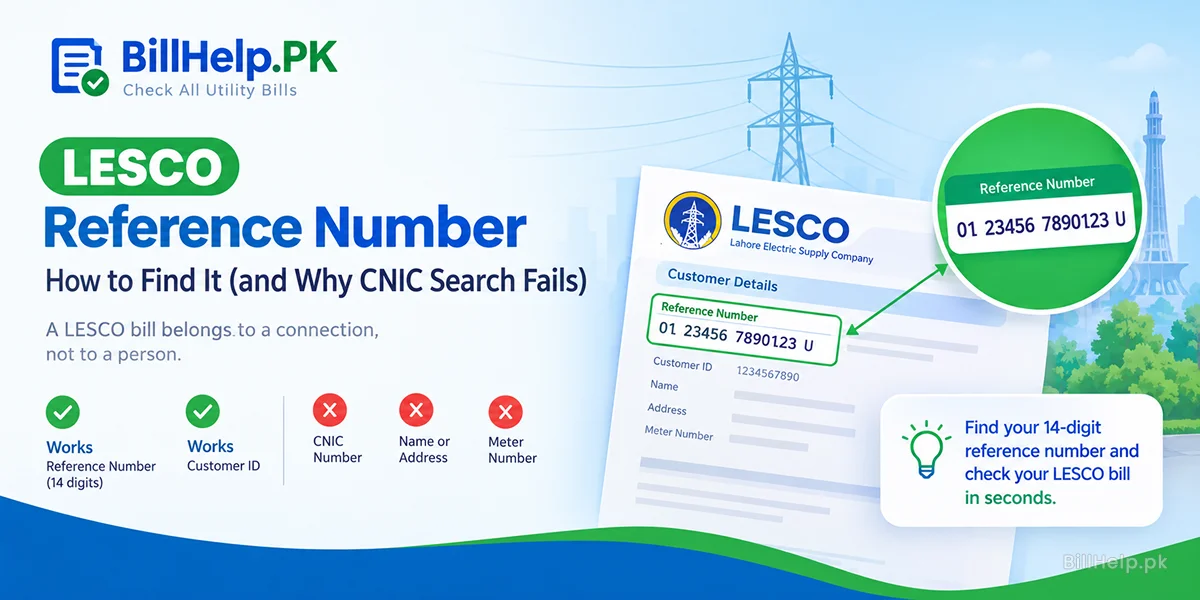
Short on time? Here is what you can, and cannot, use to pull up a LESCO bill online.
- 14-digit reference number Works
- Customer ID Works
- CNIC number No
- Name or house address No
- Meter number No official search found
So the real job is simple: find your reference number. Once you have it, you can check your LESCO bill online in a few seconds. The rest of this guide shows where to look.
Why a CNIC or name search does not work
A LESCO bill belongs to a connection, not to a person. NEPRA's Consumer Service Manual calls the reference number "a dedicated number allotted to a consumer for identification". It is printed on every bill, along with the name, address and meter number.
A name or CNIC cannot point to one bill. One owner can have more than one connection. NEPRA's manual even has rules for premises with several connections in different names. A tenant's bill is often in the owner's name, too.
Our LESCO bill page works the same way. It accepts a reference number or a Customer ID only. Searches by consumer name, CNIC or house address are not supported, for privacy and data protection reasons.
Know what you are looking for
On LESCO bills, and in NEPRA case papers about LESCO bills, the reference number appears as 14 digits in three groups (2, 5 and 7 digits), followed by a letter, U or R.
2 digits5 digits7 digitsU or R
It is not random. NEPRA's 2026 performance rules use the reference number printed on the bill to identify your sub-division, division and circle. That is why one wrong digit can open the wrong record, or no record at all.
Find it fast: pick your situation
1You have an old bill, or a photo of one
Look at the top section of the bill for the reference number field. Any past month will do in most cases. Also check your phone gallery and family WhatsApp chats. Someone may have sent a bill photo to pay it.
2You use an app or e-bill
LESCO's e-bill sign-up asks for the 14-digit reference number and the Consumer ID. If you registered, open a bill you received. If you saved the number in LESCO LIGHT or LESCO Smart, it is there. See our LESCO app and e-bill guide.
3You paid online before
Open the banking or wallet app you paid with. Check the saved billers or the payment history. The number you typed last time is often stored there.
4You live in a flat or a plaza
Go to the meter room. NEPRA's manual says that in buildings with two or more occupants, each meter must be labelled with the consumer's name and reference number.
5You are a tenant
Ask the owner for an old bill or a photo of one. The bill may be in the owner's name. If you are the new owner, read how to change the name on an electricity bill.
6Your connection is new
There may be no bill yet. NEPRA's manual says the first bill for a new connection must be issued within two months of the connection date. Late first bills are a complaint LESCO should fix within 15 days. More in our LESCO new connection guide.
7Nothing worked? Ask LESCO for a duplicate bill
LESCO's FAQ says duplicate bills are available at its customer services centres. NEPRA's manual adds that the SDO, the revenue officer and the in-charge of a customer services centre can issue a duplicate bill on the same day. The duplicate bill shows your reference number.
Take your CNIC, the full address of the connection and the meter number written from the meter. Find your nearest office in our LESCO helpline and office directory.
Got the number but the bill still will not open?
- Type the digits only. No spaces or dashes.
- Count them. A reference number has 14 digits.
- Try your Customer ID instead, if it is on the bill.
- Still stuck? Our guide on bill not found or invalid reference number explains the usual reasons.
Once it works, save the number in your phone notes. You will need it for the app, the e-bill form and every online payment.
Three quick answers
- Can I check my LESCO bill with my CNIC number?
- No. A LESCO bill is looked up by its reference number or Customer ID. We found no official LESCO bill search by CNIC or by name. If you have neither number, ask for a duplicate bill at your sub-division office or a LESCO customer services centre.
- Can I find my LESCO bill by meter number?
- We could not find any official LESCO page that searches bills by meter number. Write down the meter number from the meter itself and take it with you when you ask your sub-division office or a customer services centre for a duplicate bill.
- Where can I get a duplicate LESCO bill without the reference number?
- LESCO's FAQ says duplicate bills are available at its customer services centres. NEPRA's Consumer Service Manual says the SDO, the revenue officer and the in-charge of a customer services centre can issue a duplicate bill on the same day.
Sources: LESCO FAQs, "I have not received my bill?" (lesco.gov.pk); LESCO "Subscribe for E-Billing" page (lesco.gov.pk); NEPRA revised Consumer Service Manual sent to all distribution companies on 26 November 2025, clauses 4.2.6, 6.4.1 (bill contents), 8.2.7, 8.2.8 and 10.3.1(h) and (k); NEPRA Performance Standards (Distribution) Regulations 2026, OPS 12 survey rules; NEPRA consumer complaint case papers on LESCO bills (reference number format); BillHelp.pk LESCO bill page. Last checked: 12 Oct 2026.