1. Pakistan Telecom Tax Deduction Summary
In Pakistan, utility bills are not just a statement of consumption. They are official financial documents and therefore federal and provincial taxes are mandatorily deducted from them. Subscribers of Pakistan Telecommunication Company Limited (PTCL) – landline PSTN, copper DSL broadband, CharJi wireless LTE and Flash Fiber (FTTH) users – pay advance tax on their monthly bills.
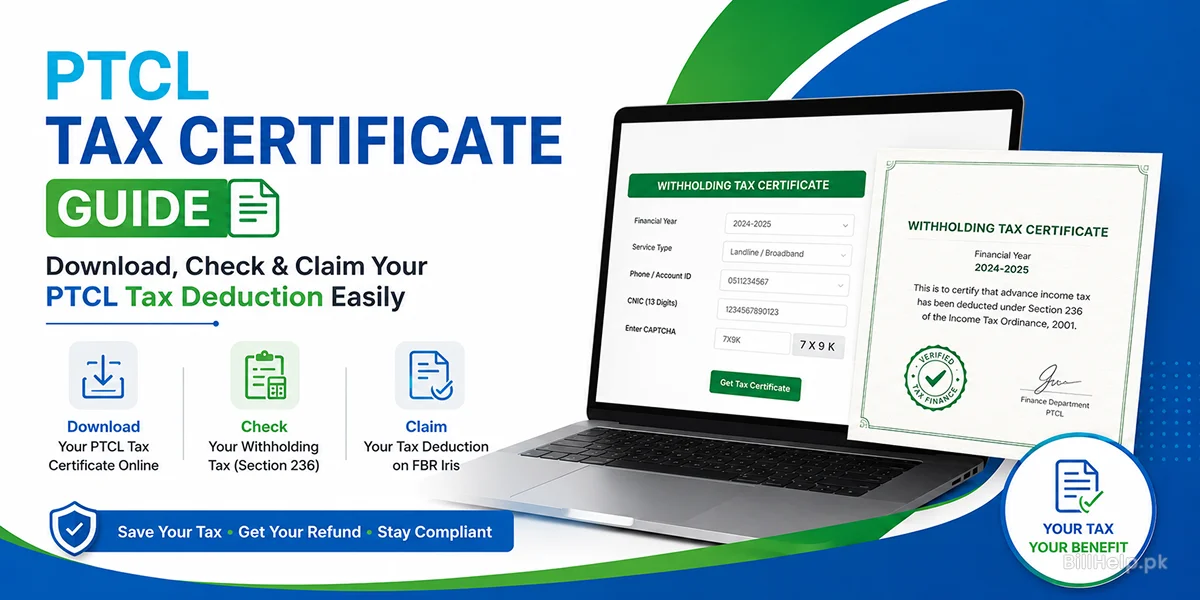
As per the statutory provisions of the Income Tax Ordinance, telecom operators are obliged to collect the Advance Income Tax / Withholding Tax (WHT) from the consumers on behalf of the Federal Board of Revenue (FBR). This advance tax is fully adjustable against your final tax liability while filing your annual Wealth Statement and Income Tax Return on the FBR Iris portal if you are a filer for income tax in Pakistan. Get your official PTCL Withholding Tax Certificate with this complete guide, learn to calculate deductions and claim tax credits hassle-free.
2. Why do you need to get PTCL Tax Certificate?
Most taxpayers do not take into account the total amount they pay each month in taxes on utility connections like electricity, mobile networks and broadband internet. The financial benefits of receiving your PTCL Tax Deduction Certificate are obvious:
- Lowers Payable Tax Liability: The advance tax collected under Section 236 directly reduces the net income tax amount you’re liable to pay to the government at the end of the financial year.
- Tax Refunds Allowed: In case the overall tax deducted from your utilities and salary is higher than your actual tax liability, you qualify for a cash refund or carry forward the credit in your FBR profile.
- Legal Proof of Tax Payment: I know how important it is to have the PDF certificate issued by PTCL and it can serve as primary proof when FBR tax officers audit or review your tax. Legal Proof of Tax Payment can be used as evidence in an audit or review of your tax return.
- Essential for Corporate & Business Filers: Sole proprietors, partnerships and corporate entities must have these certificates to record utility expenses and tax deductions in their corporate ledger accounts. Essential for Corporate & Business Filers ensures that every business keeps a record of its expenses.
3. Legal Framework: Understanding Section 236 of the Income Tax Ordinance
The collection of advance income tax, on telephone and internet bills is governed by Section 236 of the Income Tax Ordinance, 2001. Under this framework you must follow the rules:
Main Statutory Features
- Mandatory Collection: Telecom providers are required by law to deduct advance tax on the gross amount of internet, telephone and data bills.
- Filer vs. Non-Filer Status: Withholding tax applies to all connection types, but the tax rates and recovery mechanisms are frequently modified depending on whether the registered CNIC/NTN is that of an Active Taxpayer (Filer) or Non-Active Taxpayer (Non-Filer) on the FBR Active Taxpayer List (ATL).
- Adjustable Nature: Advance Income Tax – Advance Income Tax is a tax while Provincial Sales Tax (PST) or General Sales Tax (GST) are indirect taxes, on consumption. Advance Income Tax 100% offsettable against annual personal and corporate income tax assessments.
4. Step-by-Step: How to Download PTCL Tax Certificate Online
PTCL offers official digital ways to create and download the PTCL Tax Certificate without going to a branch. Once downloaded the PTCL Tax Certificate will be ready for you.
- Open your web browser. Go to the official PTCL e‑tax portal at
ptcl.com.pk/TaxCertificate. - Choose the Financial Year you want from the drop‑down menu, such, as 2024‑2025 or 2025‑2026.
- Select your service classification (e.g., Landline/Broadband or EVO/CharJi).
- Enter your Landline Telephone Number (including city area code, e.g., 0511234567) or your 10-digit Account ID.
- Enter the 13-digit CNIC Number registered to the connection (without dashes).
- Complete the security CAPTCHA verification field.
- Click on Get Tax Certificate.
- The system will generate an official PDF tax statement bearing the digital stamp of the PTCL Finance Department. Download and keep a copy in your tax records.
Download and Install PTCL Touch App from Google Play Store or Apple App Store – this is simple.
- Login with your registered mobile number,email or credentials.
- Click the Tax Certificate or Billing Services icon from the home screen.
- Choose the financial year for which you need the tax statement.
- Tap on Generate PDF Certificate and you will see the document and save it directly to your phone.
If you have technical problems on line or if the connexion is registered to a corporate NTN which does not validate on line:
- Visit the PTCL Customer Care Center or One-Stop Shop (OS3).
- Present a CNIC copy along with your PTCL Account ID or landline phone number.
- Request a printed copy of the annual Tax Deduction Statement certified by branch staff.
5. PTCL Broadband Bill Tax Calculator & Detailed Breakdown
Understanding how tax entries are calculated on your invoice helps you estimate your annual claimable tax refund. Below is a detailed breakdown of tariff rates, advance income tax, sales tax and total billing estimates, across common broadband speed tiers:
| Broadband Package | Base Tariff (PKR) | Advance WHT Tax (Sec 236) | GST / Provincial Sales Tax | Estimated Total Monthly Bill |
|---|---|---|---|---|
| 6 Mbps Unlimited DSL | Rs. 2,100 | Rs. 210 | Rs. 410 | ~ Rs. 2,720 |
| 8 Mbps Unlimited DSL | Rs. 2,450 | Rs. 245 | Rs. 478 | ~ Rs. 3,173 |
| 10 Mbps Unlimited DSL | Rs. 2,800 | Rs. 280 | Rs. 546 | ~ Rs. 3,626 |
| 20 Mbps Unlimited DSL/Fiber | Rs. 3,500 | Rs. 350 | Rs. 682 | ~ Rs. 4,532 |
| 50 Mbps Flash Fiber FTTH | Rs. 5,200 | Rs. 520 | Rs. 1,014 | ~ Rs. 6,734 |
| 100 Mbps Flash Fiber FTTH | Rs. 8,500 | Rs. 850 | Rs. 1,657 | ~ Rs. 11,007 |
*Note: Standard tax rates are subject to provincial sales tax guidelines across Punjab, Sindh Khyber Pakhtunkhwa and Balochistan. Value-added service charges, promotional discounts and arrear adjustments may slightly alter calculated values.
6. How to Claim Your PTCL Tax Deduction on FBR Iris Portal
Once you have downloaded your PTCL Tax Certificate PDF you can report the advance tax deduction in your income tax return using FBRs online Iris portal. Follow these steps during the tax filing process:
- Log in to your FBR Iris account at,
iris.fbr.gov.pkusing your CNIC/NTN and password. - Open the annual tax return form under the Drafts or Declaration menu.
- Go to the Adjustable Tax tab of the Tax Chargeable / Payments section.
- In Section 236, find the line item for Telephone / Internet Broadband.
- Click the Plus (+)Icon to add a new connection entry
- Inside the popup modal, type your PTCL connection phone number or Account ID and the provider name (PTCL).
- Enter the total Advance Income Tax deducted as shown on your PTCL Tax Certificate.
- Click Calculate to recalculate your total refundable or adjustable tax amount.
7. Provincial Tax Structures & Sales Tax Comparison
In addition to the Federal Advance Income Tax under Section 236 PTCL bills contain Provincial Tax Structures that are collected by tax boards. Provincial Tax Structures are not adjustable for individuals who file salary taxes. However business entities that are registered for Sales Tax on Services can use Provincial Tax Structures for input tax adjustments.
| Region / Province | Tax Authority Name | Provincial Sales Tax Rate | Adjustable Status |
|---|---|---|---|
| Punjab | Punjab Revenue Authority (PRA) | 19.5% | Adjustable for GST-registered businesses only |
| Sindh | Sindh Revenue Board (SRB) | 19.5% | Adjustable for GST-registered businesses only |
| Khyber Pakhtunkhwa | KPK Revenue Authority (KPRA) | 19.5% | Adjustable for GST-registered businesses only |
| Balochistan | Balochistan Revenue Authority (BRA) | 19.5% | Adjustable for GST-registered businesses only |
| Islamabad (ICT) | Federal Board of Revenue (FED) | 17% - 19.5% | Adjustable for GST-registered businesses only |
8. Troubleshooting Tax Certificate Generation Problems
If there are problems when you try to get your tax deduction certificate on the internet, please check the following common solutions:
Issue 1: "Record Not Found" or Invalid CNIC Error
This mistake occurs if the CNIC entered is not in accordance with the record registered in the master database of PTCL. This is usually the case when the connection is years old and it was registered under a different family member’s CNIC or an older CNIC number. To resolve it, you have to verify the registered CNIC from a paper copy of your bill or file a CNIC ownership update request at a PTCL Joint Shop.
Issue 2: Total Deducted Tax Certificate Discrepancy
If the total of the tax certificate doesn’t match your manual calculations, be sure you selected the correct financial year (July 1 to June 30) and not a calendar year (January 1 to December 31). FBR tax accounting period is in line with the financial year cycles.
Issue 3: Download Button Not Working or PDF Doesn’t Load
Try disabling your browser’s pop-up blocker or use a different web browser (such as Google Chrome or Mozilla Firefox). You can also download the PDF directly to your device’s storage via the PTCL Touch app – it takes just a few taps.
9. Frequently Asked Questions (FAQs)
Q1: Can Non-Filers get refund for Advance Income Tax paid to PTCL?
The FBR portal cannot be used by non-filers to directly claim a refund or tax credit. But you can claim tax credits for prior eligible fiscal years if you file your tax return and become an active filer on the ATL.
Q2: What is the official financial year cycle for filing FBR Tax in Pakistan?
The financial year starts from July 1 of any year, until June 30 of the next year – so you know when to file. For example, Financial Year 2025 – 2026 would cover all bills raised from July 1, 2025 till June 30, 2026.
Q3: Is there any possibility to file tax deduction on a PTCL Line which is in the name of landlord or parent?
As per FBR tax regulations, the withholding tax deductions must be linked to the CNIC number present on the utility bill. In case your utility line falls under the name of your landlord/parent, then you can make an application for ownership transfer of PTCL line at PTCL Joint Shops.
Q4: Is General Sales Tax (GST) on my personal tax return?
No Provincial Sales Tax / GST is a consumption tax and is non-refundable for individual income tax filers. Only Advance Income Tax (Withholding Tax) collected under Section 236 is adjustable against income tax liabilities.
Q5: Is there any fee for downloading the PTCL Tax Deduction Certificate?
No obtaining your tax certificate via the website or the PTCL Touch mobile app is completely free of charge.
10. Quick Link Directory for PTCL Users
Explore our related utility guides, on BillHelp.pk to resolve billing questions:
Guide for PTCL Online Bill Check
Find out how to view, search and download your PTCL bill duplicate online.
How to Pay Your PTCL Bill Online
EasyPaisa, JazzCash and Banking Apps Payment Methods – Step by Step.
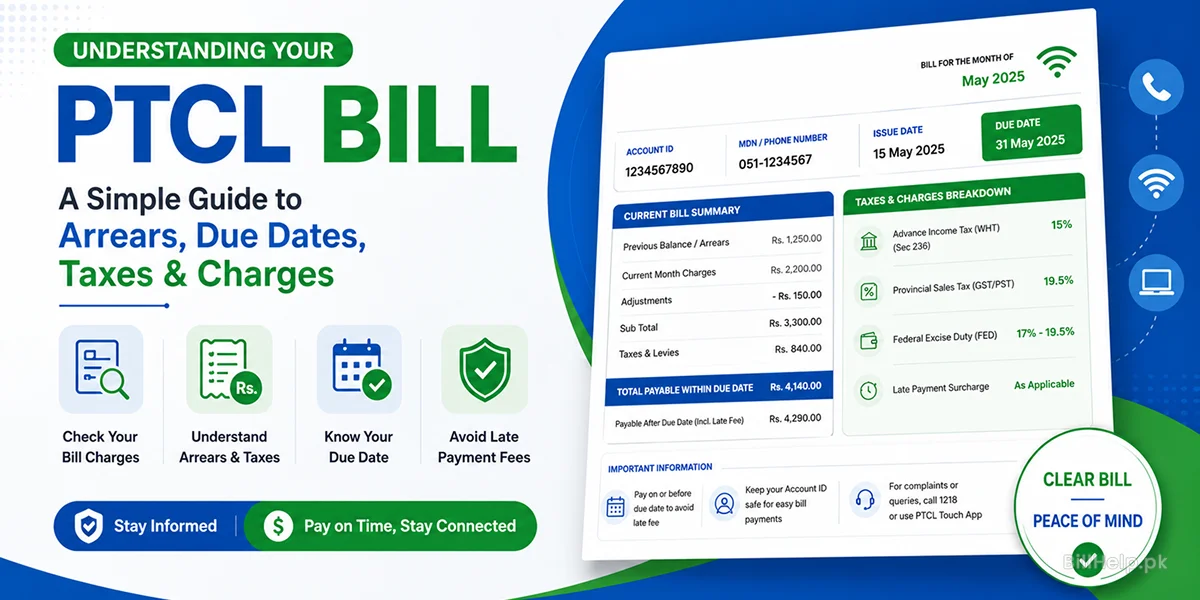
Understanding Your Bill Arrears and Charges
Breakdown in detail of PST, WHT, line rentals and calculation of arrears
Flash Fiber Billing Guide
All you need to know about PTCL FTTH Optical Fiber Bill.